Arc Raiders
PRIVATE SOFTWARE
ANCIENT
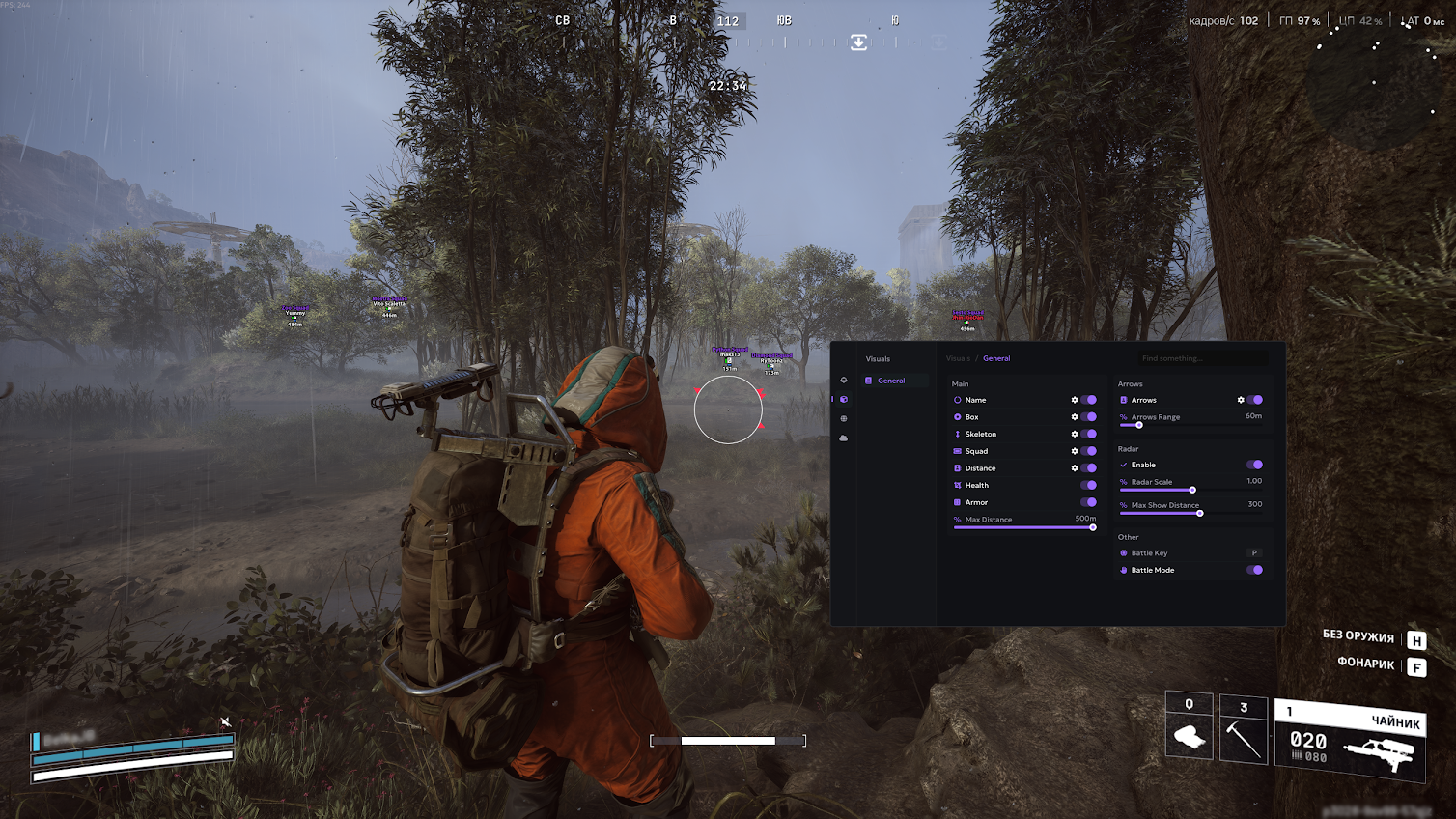
Ancient for Arc Raiders is a precise and stable private cheat focused on accuracy and awareness. Equipped with aimbot, player ESP, loot ESP, and drone ESP, it gives you full control over every encounter—on the ground or in the air. Track enemies, identify valuable items, and detect drones before they spot you. Built for clarity and performance, Ancient provides smooth visuals and responsive handling, helping you react faster, aim sharper, and dominate every operation with confidence.
STATUS
ON UPDATE
FEATURES
AIMBOT
- Enable
- Aim Key
- Aim Type: (Mouse; Memory)
- Smoothness (slider)
- Draw FOV
- FOV Radius (slider)
- Prediction
- Prediction Dot
- Target Line
- Target
- Target Lock
- Visibility Check
- Aim at Knocked
- Max Aim Distance (slider)
- Target Bones
- Drone Aim
- Weak Spot Aim
- Max Drone Aim Distance (slider)
VISUALS
- Name (visible and invisible colors)
- Box (visible and invisible colors)
- Skeleton (visible and invisible colors)
- Squad (visible and invisible colors)
- Distance (visible and invisible colors)
- Weapon
- Health
- Armor
- Show Knocked
- Max Distance (slider)
- Arrows
- Enable Arrows
- Arrow Range (slider)
- Radar
- Enable Radar
- Radar Scale (slider)
- Max Show Distance (slider)
- Other
- Battle Mode Key
- Enable Battle Mode
MISC
- Instant Hit
- Faster Animations
- Animation Speed (slider)
- Local Anti-Aim
- Flashlight Changer
- Spread Compensation
WORLD
- Crates (each option configurable separately)
- Enable
- Draw Dot
- Draw Name
- Color
- Draw Distance
- Limit Distance
- Max Distance (slider)
- Show in Battle Mode
- Drones (each option configurable separately)
- Enable
- Draw Dot
- Draw Icon
- Draw Name
- Color
- Draw Distance
- Limit Distance
- Max Distance (slider)
- Show in Battle Mode
- Traps
- Enable
- Draw Dot
- Draw Name
- Color
- Draw Distance
- Limit Distance
- Max Distance (slider)
- Show in Battle Mode
- Other (Dropped Items, Corpse, Salvage, Carryable, Supply Station)
- Enable
- Draw Dot
- Draw Name
- Color
- Draw Distance
- Limit Distance
- Max Distance (slider)
- Show in Battle Mode
CONFIGS
- Save
- Load
- Delete
- Share
- Other
- Language: English/Russian/Chinese
- Translate Loot Names
- Font Size
- Show Overlay FPS (slider)
MEDIA