HWID SPOOFERS
PRIVATE SOFTWARE
VEX
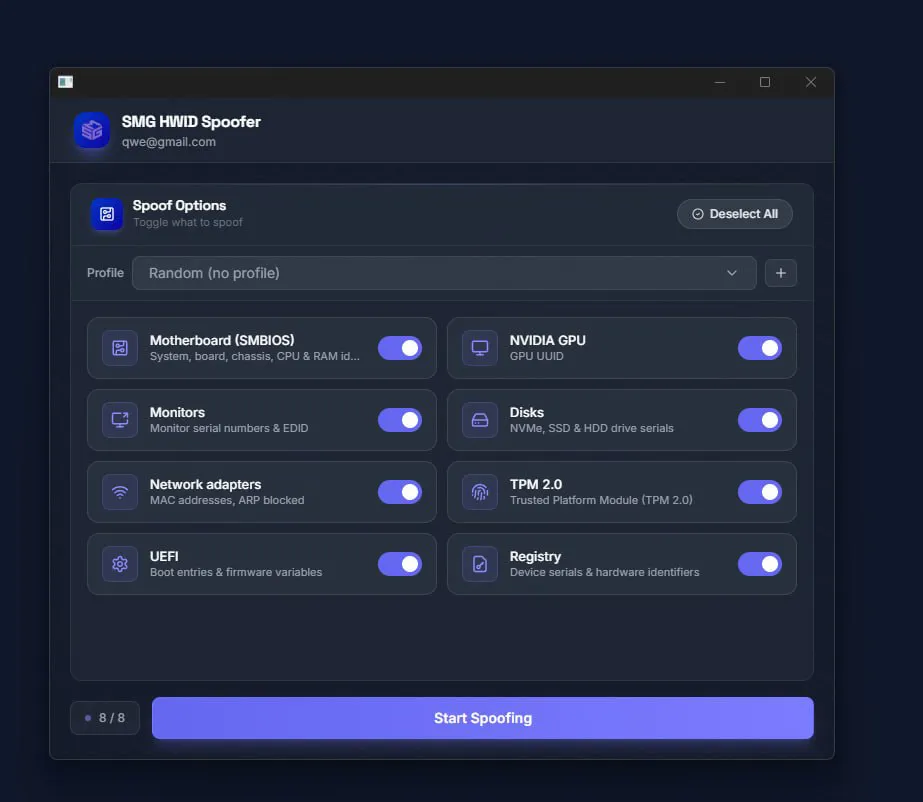
VEX HWID Spoofer for Easy Anti-Cheat puts hardware-identity changes under your control. Component toggles let you choose which parts of your PC to spoof, from motherboard and drive identifiers to network adapters, rather than applying the same selection to every setup. A built-in cleaner complements that selection by removing anti-cheat traces and temporary files. Configure the components you need and keep the spoofing process focused on your setup.
The supplier's setup requirements include disabling Windows Defender and SmartScreen, uninstalling third-party antivirus software, and removing FACEIT and Vanguard before running the tool.
STATUS
UNDETECTED

FEATURES
- SMBIOS spoofing: changes motherboard, system, CPU and RAM identifiers.
- NVIDIA GPU spoofing: changes the UUID of NVIDIA graphics cards.
- Drive spoofing: changes NVMe, SSD and HDD serial numbers.
- Monitor spoofing: changes monitor serial numbers and EDID data.
- Network-adapter spoofing: changes MAC addresses.
- UEFI and registry spoofing: cleans and modifies boot entries, firmware variables and hardware identifiers in the Windows registry.
- Built-in cleaner: removes anti-cheat traces and temporary files.
- Component toggles: choose which hardware components to spoof.
MEDIA